Four small mods I use to make long Claude Code sessions easier to follow. They work in the terminal and the Code tab of Claude Desktop.
session hud
A strip above the prompt shows your Git branch, context usage against a target you choose, and weekly account usage. Open Details for the context breakdown, five-hour and weekly limits, and session cost.
For a separate tray app that also tracks Codex, see Agent Context Monitor.
tool cards
Tool calls become cards with the action, status, tool, timing, and result. Output stays behind Details until you need it. Failures open automatically.

next steps
Two or three suggested prompts appear after each turn. Click one to draft it in the desktop prompt box, or press 1, 2, or 3 in an empty terminal prompt. Each round sends your last few messages to Haiku and uses one small model call.
This is a fork of Hamza Zafar’s Next Steps mod, with desktop buttons added.
source control
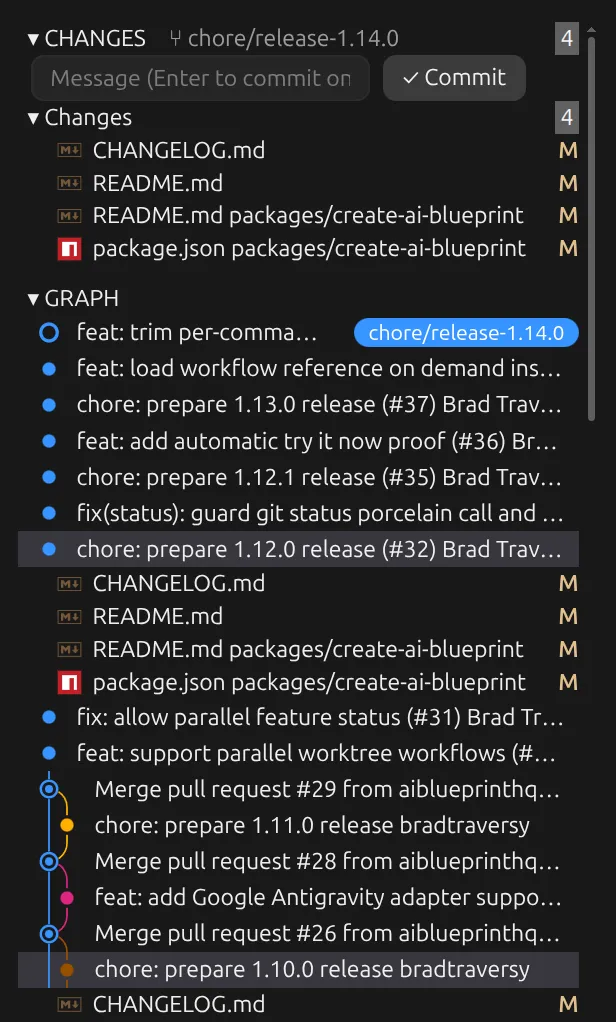
A pane beside the chat brings in a VS Code style Source Control view. See staged and unstaged files, stage changes, discard with confirmation, and commit. The Git graph shows your branch and upstream. Expand a commit to see its files, then open a file in VS Code on Linux.
Commits from the pane skip repository Git hooks. Use the terminal or VS Code to commit when those hooks matter.
install
Add the marketplace, then install whichever mods you want:
claude plugin marketplace add bradtraversy/traversy-claude-mods
claude plugin install session-hud@traversy-mods
claude plugin install tool-cards@traversy-mods
claude plugin install next-steps@traversy-mods
claude plugin install source-control@traversy-mods
Start a new session or enter /reload-plugins. The repo has requirements and
setup instructions for both terminal and desktop use. Custom visuals don’t
appear in the VS Code chat panel or non-interactive sessions.
Mods run with your user permissions. Read the source before installing. All four are free and open source under the MIT license.